SageOxSageOx
ProductPricingBlogAboutJoinDocs
Sign inGet started
ProductPricingBlogAboutJoinDocs
Sign inGet started
SageOx

The shared context and operating toolkit for human-agent teams.

SageOx, Inc.2800 1st AveSeattle, WA 98121
Product
OverviewSageOx for MacDocumentationChangelogBook an onboarding session
Company
AboutBlogJoin our teamContact
Elsewhere
GitHubLinkedInX
© 2026 SageOx, Inc.
PrivacyTermsAcceptable use
ProductPricingBlogAboutJoinDocs
Plans
  • How it works
  • Who it helps
  • Questions
  • Related

Write the plan, and your whole team can review it.

Plans docs

How it works

01
Install the ox CLI and run ox init in your repository.
02
Tell Claude Code or Codex what to plan and who decides. It writes a visual page and saves it to SageOx.
03
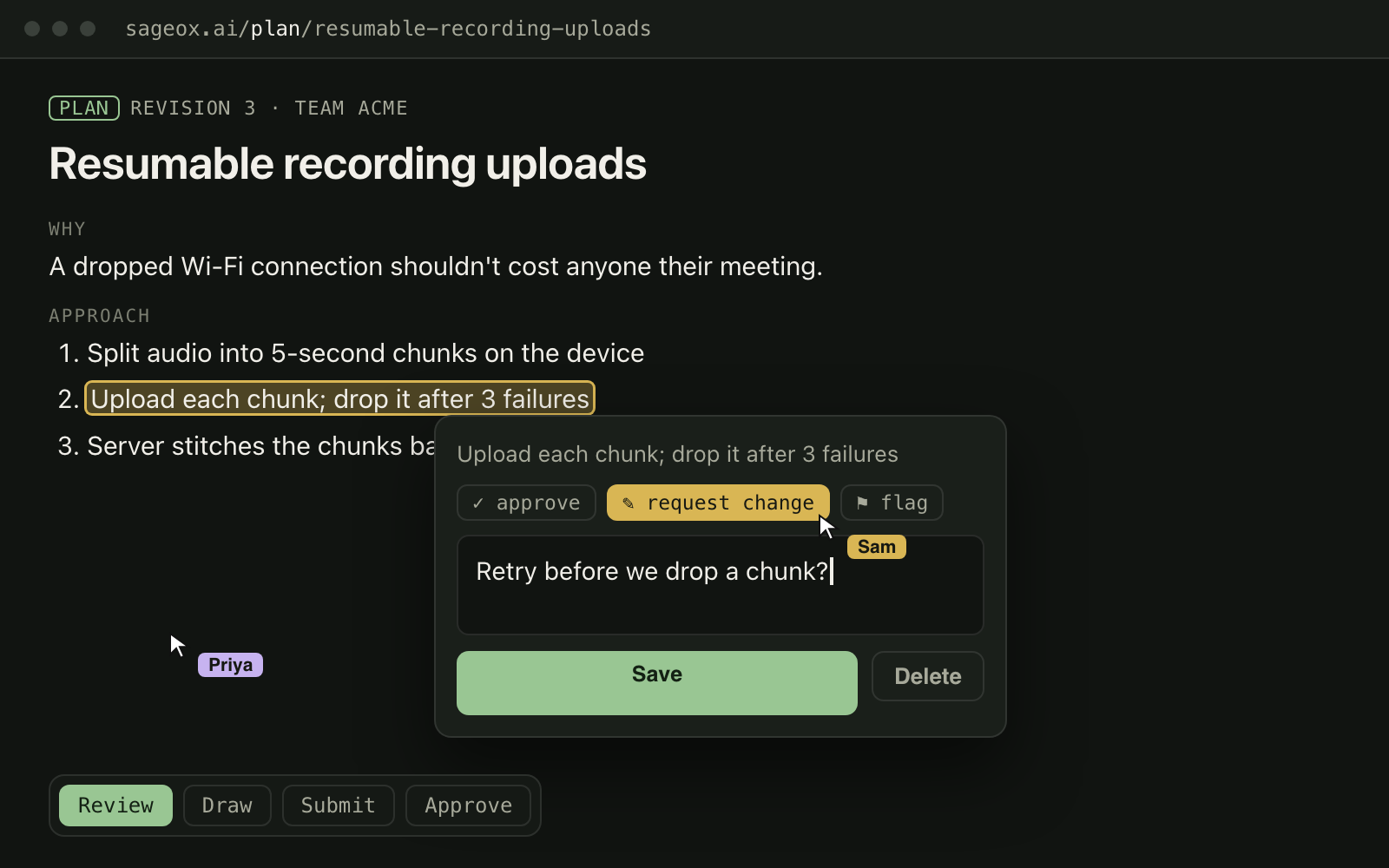
Teammates open it under Plans on SageOx, highlight the words they mean, and comment, request a change or approve.
04
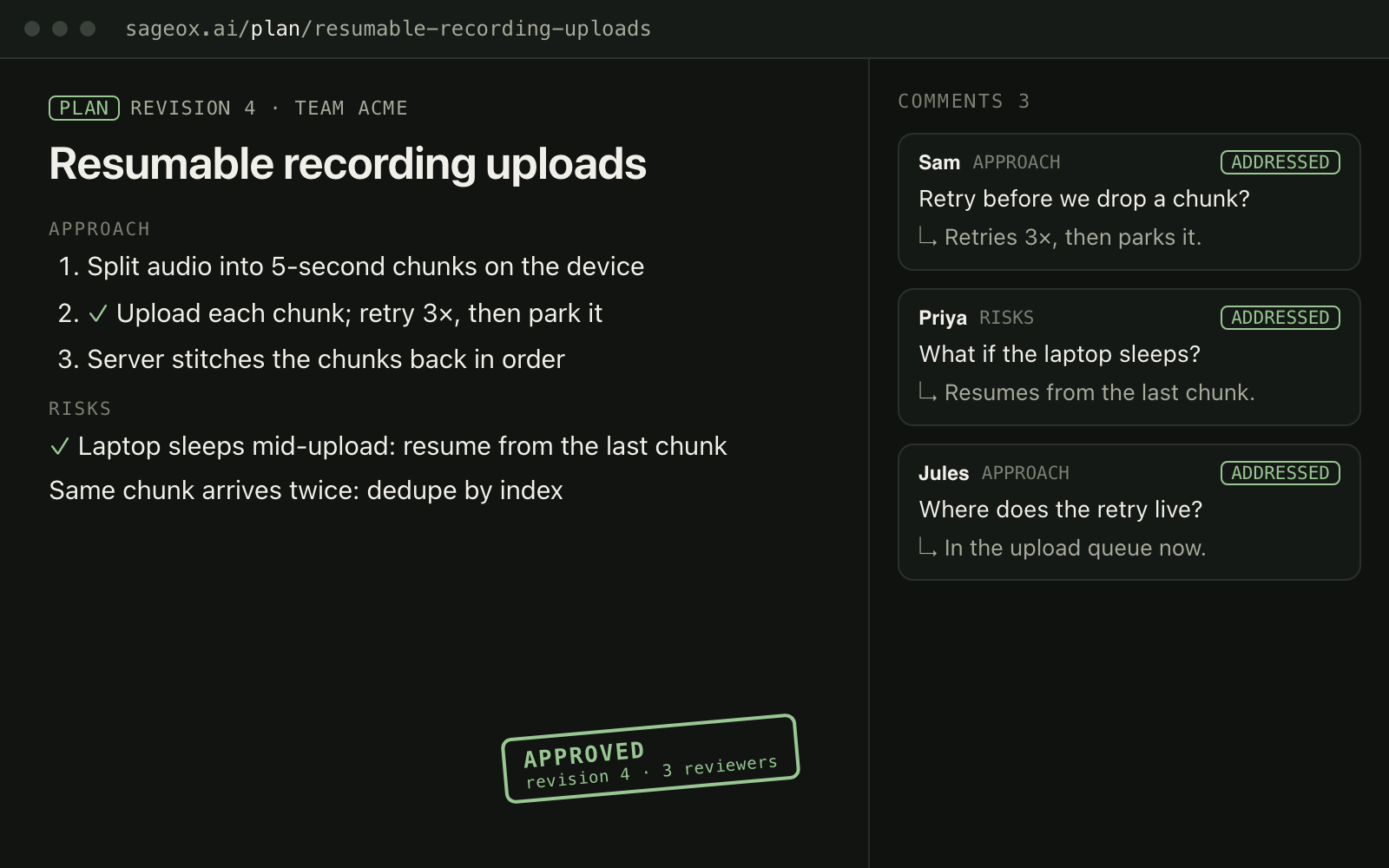
Claude Code or Codex answers each note and updates the same page. The pull request links back to the plan.

Once per repository

$ curl -fsSL https://raw.githubusercontent.com/sageox/ox/main/scripts/install.sh | bash

$ ox init

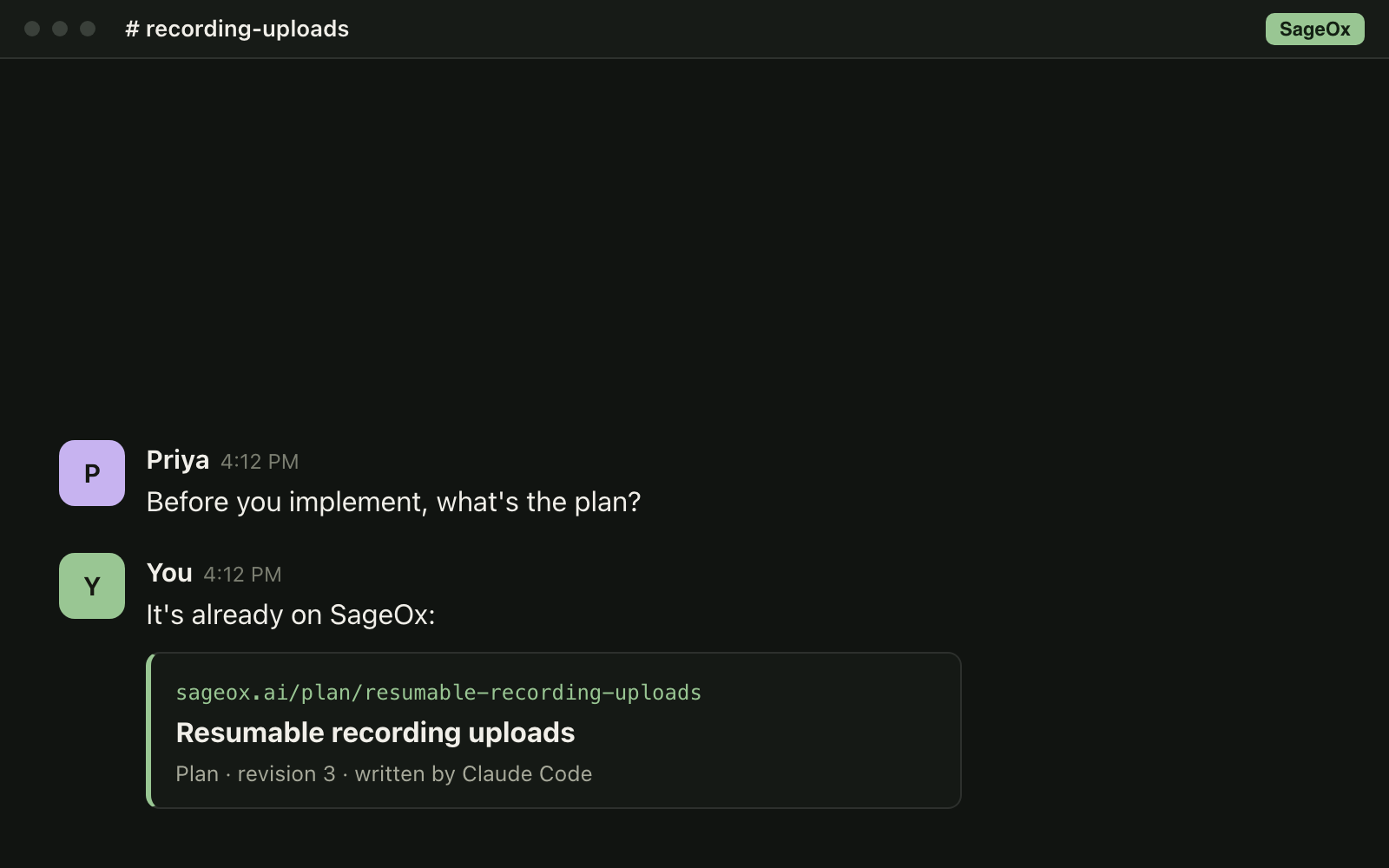
Already on SageOx

A teammate asks for the plan, and the reply links it on SageOx

The note stays on its line

A plan open for review on SageOx: a teammate requests a change on one step

Every note answered

Revision 4 of the plan, with every comment marked addressed
  1. 01

    Set up once

    Install the ox CLI and run ox init in your repository.

    $ curl -fsSL https://raw.githubusercontent.com/sageox/ox/main/scripts/install.sh | bash

    $ ox init

  2. 02

    Ask for a plan

    Tell Claude Code or Codex what to plan and who decides. It writes a visual page and saves it to SageOx.
    A teammate asks for the plan, and the reply links it on SageOx
  3. 03

    Review it together

    Teammates open it under Plans on SageOx, highlight the words they mean, and comment, request a change or approve.
    A plan open for review on SageOx: a teammate requests a change on one step
  4. 04

    Ship it

    Claude Code or Codex answers each note and updates the same page. The pull request links back to the plan.
    Revision 4 of the plan, with every comment marked addressed

Who it helps

Engineers

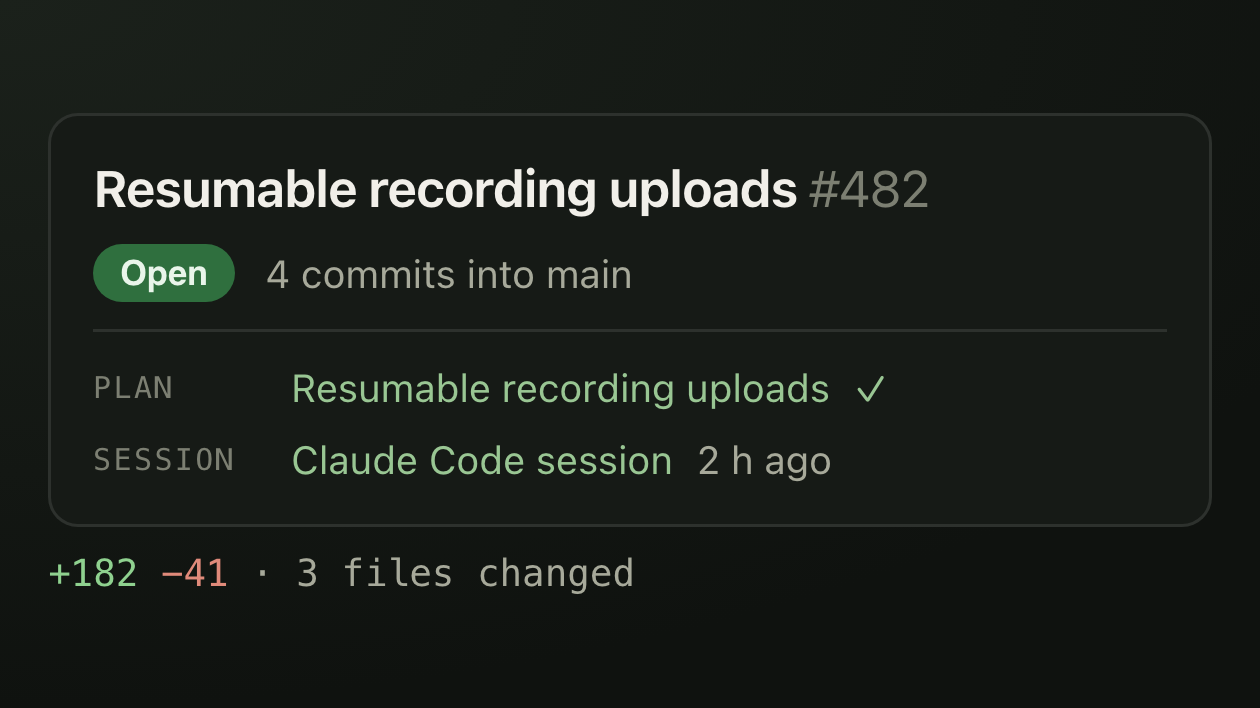
Agree on the approach before any code is written, and keep the reasoning linked to the pull request.
A pull request whose description links the plan it carries out and the session that wrote it

Product, design and go-to-market

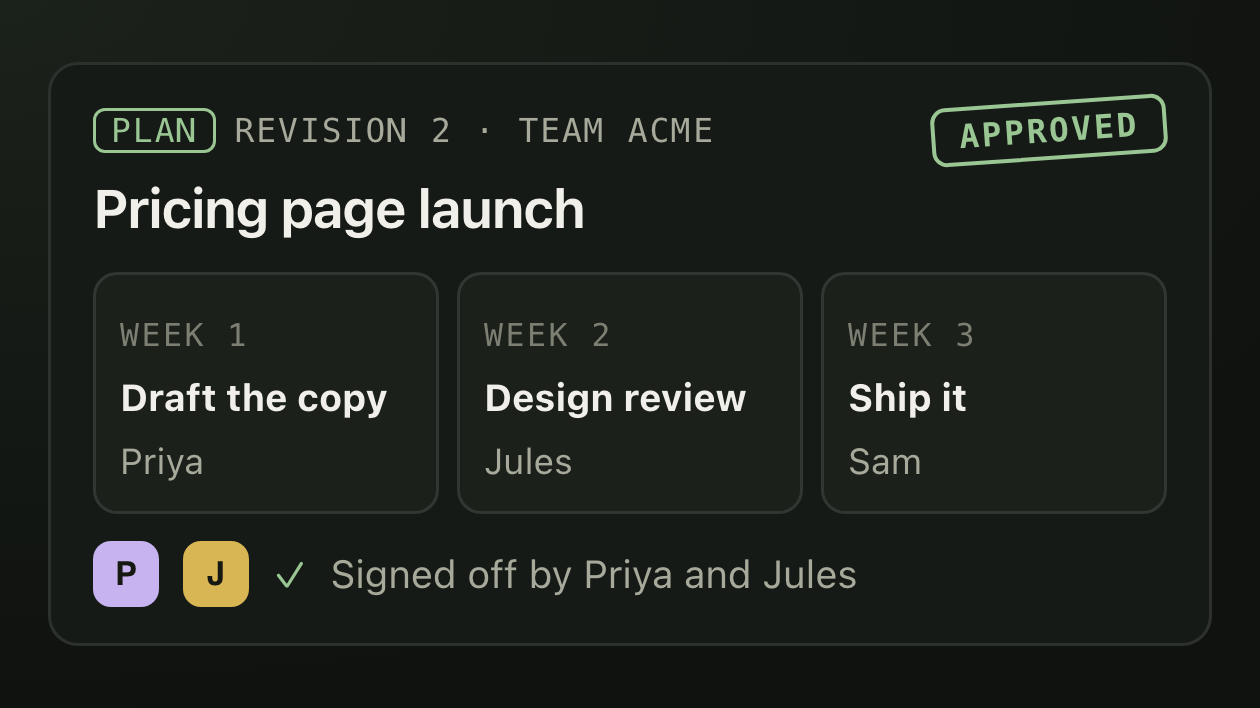
Plan a launch, a rollout or a mockup the same way, and get sign-off from the people who decide.
A launch plan laid out week by week, approved by two teammates

Who sees it, and where it lives

Plans docs
  • Members only

    Only members of the plan's team can review it and see where teammates point on the page.

  • One link, full history

    Each revision keeps the same link, and every version stays in git.

  • Review trail

    Every review round is saved with the plan, so the next reader sees what was asked and what changed.

Questions

How do I share a plan from Claude Code with my team?
Set up the ox CLI in your repository and ask Claude Code to save the plan with SageOx. Your team opens it on SageOx under Plans. Codex works the same way.
Do plans have to be about code?
No. A launch, a rollout, a mockup or an engineering change all work. You write the plan from a code repository, but it can be about anything your team does.
What if I work alone?
Plans still help. You review one page instead of a wall of text, and every plan stays searchable for whoever comes next.

Also in plans

Mockups and reviews

Save a clickable mockup, a review sheet or an evidence page the same way, with its own link.

Every plan in one place

Open Plans in your team's left nav to see every saved plan, newest first.

Related

  • Team Context

    Where a plan's cited evidence comes from.

  • Pull request context

    The pull request credit line links the plan and the session that produced it.

  • Murals

    Saved plans can appear as sources behind a mural scene.

For your AI teammates

Paste this into your AI teammate. It says what this feature does and how to use it.

Prompt
# Plans

SageOx Plans are visual plan pages written in a Claude Code or Codex session, saved to the repository's Ledger and enriched from Team Context.
Members of the plan's team review it on SageOx by highlighting text, commenting, requesting a change or approving.
The author's coding tool picks up each note and revises the same page. The pull request that carries out a plan links back to it.
Plans docs
  • Save a planox CLI
    ox plan save --file plan.html
  • Wait for your team's reviewox CLI
    ox plan review await
  • Read a plan in AI chatMCP tool
    GetPlan

Put your next plan in front of your whole team.

Get started free

Plans are written in a repository set up with the ox CLI.